What Dips Thompson, mentor of Cloudside Coders, learned during her first term at Code Club

Dips Thompson launched her Code Club, Cloudside Coders, at Cloudside Primary School in Nottingham, UK, in June 2025.

After completing her first term with creators aged between seven and eight, she’s sharing key lessons for new mentors.

A mentor points at a laptop screen displaying a Scratch programming interface while a young creator observes and engages during a Code Club session.

Kicking off club sessions

Our Code Club runs after school, and I’ve built a routine that helps everyone transition. Some of my amazing Code Club creators have jobs — they help get the iPads and login details ready and hand them out. It gives them a real sense of ownership over the club.

Once everyone’s settled, we spend a few minutes catching up, discussing their week and what they’re excited to create. I then introduce a collaborative project, showing the finished version before guiding them step-by-step. This often sparks their own ideas, encouraging variations later, which is a helpful approach for my young group.

Navigating logins

My biggest piece of advice for new Code Club mentors? Don’t get bogged down with logins, especially for younger creators. I learned this the hard way in my first session and saw creators struggle with keyboards and password complexities. 

We introduced Scratch logins in Week 3, and by Week 6, most creators could confidently remember their passwords. It was a game-changer!

Introducing Code Club projects

In our first session, I showed the Code Club project site, explaining the layout and how to use it. For my young creators, having two tabs open and following instructions independently felt a little overwhelming for them. We now follow the Scratch pathway together. I choose a project, and most creators follow my step-by-step guidance on their own devices. 

My goal is to gradually build their confidence and skills until they can tackle projects independently.

An informative webpage showcasing the Code Club, featuring sections on Scratch, Python, and Artificial Intelligence project paths. Each section includes a brief description of the coding project options available.

Adapting when things don’t go to plan 

Things rarely go exactly as planned in Code Club, and that’s totally normal. If I notice too many creators stuck on the same piece of code, struggling with logins, or if a lack of digital literacy skills is holding us back, I know it’s time to adapt.

I often split creators into groups to address common problems more efficiently. If a significant number of students can’t access a project due to digital literacy gaps, we’ll pause for a quick skills session, and maybe practice mouse control, typing, or navigation. I also encourage a “brain, book, buddy, boss” system. This empowers them to first think, check resources, ask a peer, and only then come to me. This approach builds their independence.

Giving creators ownership

To give creators more ownership, I encourage them to customise sprites and backgrounds. For our “Catch the Bus” project, for example, we kept the core code, but they were free to choose their own characters and settings. This led to awesome variations like “Catch the Hippo” or “Catch the Train,” which truly ignited their creativity. I’m hoping that as they get more confident, they’ll choose their own projects and pathways entirely. 

A playful cartoon cat running alongside a bright red double-decker bus on a sunny street, with green grass and clouds in the background.

Tips and resources that made running my Code Club easier

I’ve found a few key tips and resources helpful when launching my Code Club. 

Practical tips

  • Device checks: To ensure iPads are fully charged for Code Club sessions, we have a dedicated tech monitor who checks them on Code Club day. This has been super helpful.
  • Scratch Classroom: I use Scratch Classroom with anonymised accounts to easily generate usernames and passwords. This allows young people to log in quickly and save their work without frustration.
  • Peer support: I strategically group more confident programmers with less confident ones. This buddy system effectively handles many common questions.
  • Testing projects: Before I introduce any new project, I build it myself first. This helps me anticipate questions and spot any misconceptions creators might encounter.

Essential resources 

The Code Club website offers fantastic resources that were invaluable when I was starting out:

  • Code Club project site: A treasure trove of coding projects
  • Leader guide and session checklist: Essential for planning and running sessions
  • Code Club online course: Super useful for getting tips and ideas
  • Code Club Login letters/account permission: A lifesaver for getting parental consent
  • Progress Maps: A great way for creators to track the projects they’ve completed
Colorful introduction posters for different coding projects including Scratch, Python, micro:bit, and web development, displayed on a green background with playful icons.

Our Code Club is still in its early stages, but I have high hopes for it. I’m excited to dive back in come September and explore more Code Club resources, such as the one-page projects, and possibly even get creators involved in the Astro Pi Mission Zero and Coolest Projects.

Inspired by Cloudside Coders? Join the movement, and start a Code Club in your community! 

Welcome to Code Club: Mentors share their support and advice

Starting a new Code Club is an exciting adventure! As more clubs open around the world, we’ve gathered some helpful advice from experienced mentors to help you start confidently and run a club your creators will love.

A group of individuals participating in a Code Club session, with a focus on a mentor wearing a 'code club' shirt. Several participants are engaged with laptops on a collaborative learning environment.

Embrace the uniqueness 

I tell my new leaders to embrace the chaos! It’s a sign of creative and active learning taking place. A Code Club can be a noisy place, but this usually means that young people are talking about their projects, problem solving, asking questions, playing each other’s games, and connecting with others.

Also, embrace the creativity and different experiences that young people bring to your club. This will come out through their projects. Everyone may start on the same task, but in the end, you have many different projects. This is something to celebrate and share within the group, so allowing time in your program at the end of each session to share is vital. It might be a ‘gallery walk’ where everyone walks around the room and can stop at any project that interests them, or you might choose 2 or 3 to show the whole group.

– Kaye, Code Club Australia

A smiling mentor and a young girl collaborate at a computer, with the text 'Make your ideas' prominently displayed.

Keep it simple and start small 

Keep it simple — start with a small group of creators to gain experience and build confidence together. As everyone progresses, gradually increase the number of club members. Don’t feel pressured to be an immediate expert; view this as a learning process for both you and the creators, and embrace that journey, and always have fun along the way.

Darren, Code Club mentor, Ireland

Logins can come later

Don’t worry too much about logins (apart from for the actual devices). Creators can get started straight away with coding without logging in. Logins to Scratch and/or the projects site can come later on or as and when they are ready to start saving their work.

Dips, Code Club mentor, Nottingham, England

Show what they’ll learn

Start with a strong and exciting introduction session. Show a simple but impressive project to spark curiosity — let the creators see what they can create.

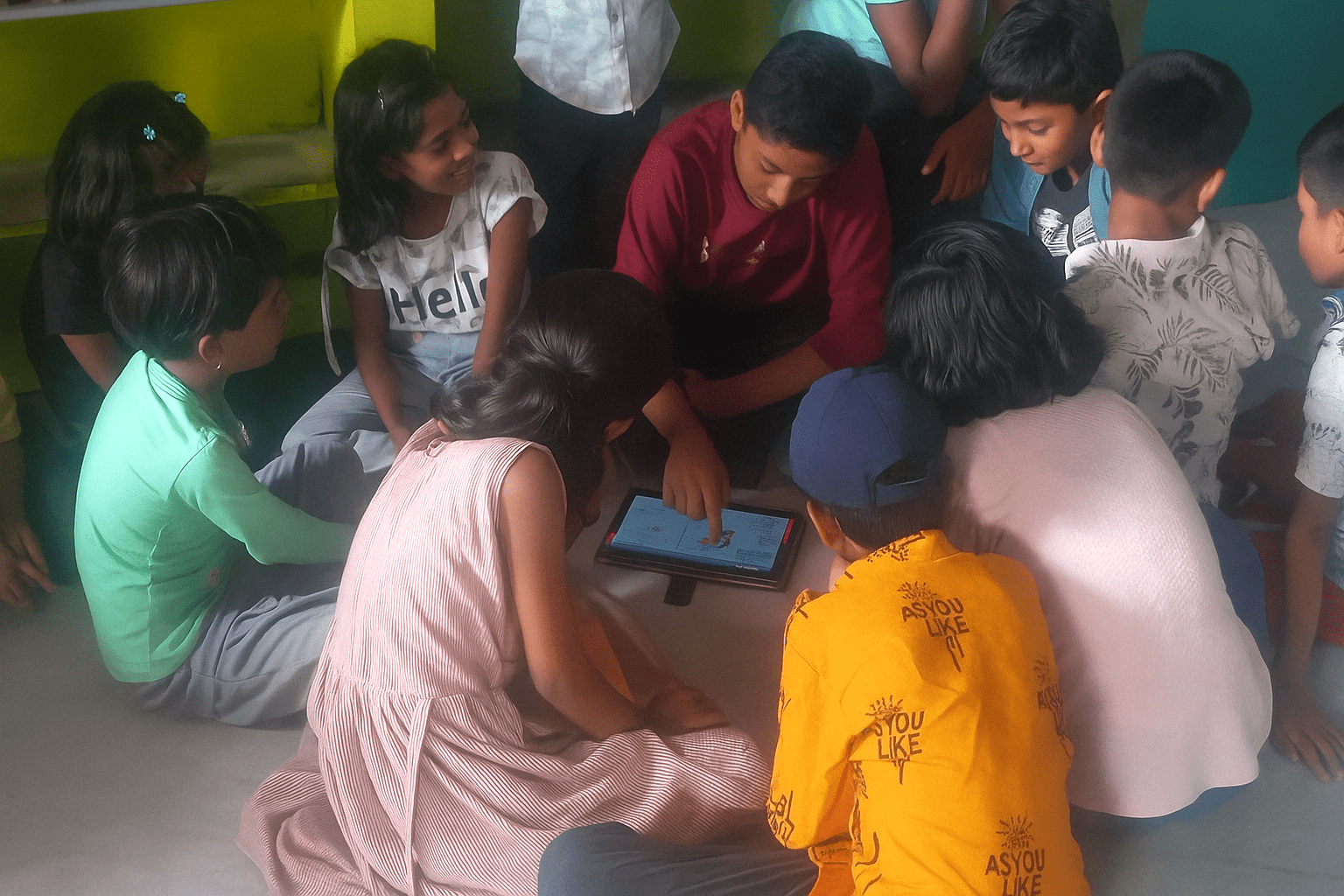
A group of children gathered around a tablet, engaged in collaborative learning and coding activities, showcasing creativity and teamwork in a vibrant classroom environment.

Emphasise that they’ll learn more than just coding. They’ll build: logical thinking, problem-solving skills, and bug detection. These skills are not just for coding — they’ll help in maths, science, other subjects, and even in real-life decision-making.

Remind them: Coding is not just about computers. It’s about learning how to think.

Manoj Bidkar, Code Club mentor, India

Try the projects out!

If you’re just beginning and haven’t got much confidence yet, following one of the guided paths is a good way to start. If I was starting out now, I’d do all the Scratch activities in the Introduction to Scratch path on my own first — and then support the children to do those. You can be more flexible once you’ve got some experience, and then it can depend on the size of the group and your own experience.

Anne Carill, Code Club mentor, York, England

Screenshot of the Code Club website displaying project paths for Scratch, Web Design, Python, and Artificial Intelligence. Each section provides a brief description of the skills learners can develop.

Focus on having fun

Make sure to create a chill vibe where everyone feels comfortable asking questions. Don’t stress if things don’t go as planned — just roll with it and adjust. Pairing students up can be super helpful, and don’t forget to celebrate those small wins. Keep the focus on having fun and learning, and you’ll be golden. Good luck, and enjoy the ride!

Vipul Rathod, Code Club mentor, India

We hope these tips help you on your Code Club journey! And don’t forget to explore our resources for even more support!

Girl holds a laptop showing a coding project while smiling woman beside her holds a sign reading “we made this”.

“We made this!” Discovering the power of agency in your Code Club

Explore how empowering young people to choose their projects, topics, or programming languages can lead to more engaged Code Club creators who believe their actions make a real difference.

Girl holds a laptop showing a coding project while smiling woman beside her holds a sign reading “we made this”.
Choose from hundreds of Code Club projects, in up to 30 languages

What do we mean by ‘agency’?

At Code Club, giving young people agency means fostering a culture where creators are driven and self-motivated to direct their own growth through their passion for coding.

What are the advantages?

By giving creators agency, you’ll create a more meaningful learning experience. If you allow your creators to work on ideas they care about, their curiosity becomes the foundation for them to develop their coding skills.

We want creators to feel empowered at Code Club and to open up opportunities for them to feel that their voice and their actions can make a difference. This is one way to encourage them to become more engaged and confident. But giving your creators agency doesn’t mean giving up control entirely; help from mentors is essential to getting your creators started in these steps towards independence. Of course, they will also need your guidance and feedback to make lasting progress.

“You can see on their faces when they are creating something from zero that they feel like magicians. They start to create their own things because we have given them the tutorials to follow the steps; they create new things and bring their own projects and new ideas to us!”
– Iliana Ramirez, Code Club Partner, Mexico City

Two children smile while working together at laptops in a busy Code Club.
Use our projects to create games, animations, and much more

So, how can you give your creators agency?

Adding choice to your Code Club sessions can be really simple. Creators volunteer to come to Code Club, and so they have already made their first decision: to follow one of their interests. Once they have arrived, there is no right way to learn to code, so each creator can discover their own path.

Here are three easy ways you could help your creators take ownership of their learning journey at your next session:

1. Projects

Try offering three project ideas and letting creators team up to work on the one they each like best. You could also let creators choose any project they like from our project site.

Offer your creators a thrilling change of pace with these three projects:

Silly Eyes

‘Silly eyes’ is a Scratch project that gives creators the freedom to create their own silly eyes character. The character’s large, silly eyes will follow the mouse pointer and bring the character to life.

Teach a machine

‘Teach a machine’ is part of our AI toolkit path. Creators use a webcam and machine learning to train a computer to tell them how many fingers they are holding up.

Music Player

Get ready to play and share all the best tunes on the BBC micro:bit with ‘Music Player’. Your creators don’t even need the physical micro:bit to try this one.

We have over 200 coding projects to choose from, and each supports creators to learn at their own pace and grow their confidence.

2. Topic or theme

Why not challenge your creators to agree on a theme for the next Code Club session and create projects that link to the topic? Mentors can then encourage them to share how their projects link to the theme at the end of the session and vote on the next theme together. 

A topic can be anything that your creators are interested in, such as animals, a favourite sport, or a seasonal festival. 
You can link our projects to any topic with a bit of imagination. A volcano theme might lead to adapting Boat Race to create a game where you can’t touch the lava. You will find that your creators have lots of ideas!

3. Computing language

Give your creators a choice of which computing language they use through our project paths. Each path is a collection of six projects that cover a set of skills needed for a particular piece of hardware or software alongside design and engineering skills. 

Provide your creators with the information they need to make a choice from a number of different project paths and let them explore the ones that interest them the most.

It is important that creators start at the ‘Introduction to…’ level if they are new to the software or hardware being covered.

Explore the Code Club projects

Start exploring the Code Club projects site and give your creators the agency to make projects they care about at your next Code Club session.