Keeping young people safe: Top tips and useful resources

John McAtominey leads our work supporting Code Clubs in the UK, and is part of the safeguarding team at the Raspberry Pi Foundation. He also runs a Code Club in his local community, Selby CoderDojo. Here he shares his top tips and highlights some useful resources to help you keep your creators and mentors safe.

A group of children and mentors at a Code Club event, holding colorful signs that say 'Be Cool', 'Join the Club', 'We Made This', and '{code club}'. They are smiling and posing together in a classroom setting.

All Code Clubs running around the world in schools, libraries, and community spaces are unique. There is no one-size-fits-all approach to safety, but here are some key things to consider. It is important to think about other ways to make your club as safe as possible too!

Understanding and managing risks

Take a moment to think about any risks that might affect people in your club — and, most importantly, what you can do to reduce or remove these risks. Risks could include damaged electrical cables, or not having a way to block inappropriate content online. Create a risk assessment for your club — we have an example risk assessment you can use to help you get started. Work on your risk assessment as a group of mentors, review it regularly, and make sure it is always available. You can find out more about our health and safety guidelines here.

A template for a risk assessment form designed for Code Clubs, including sections for hazards, at-risk individuals, current measures, and actions to control risks.

Safeguarding sponsors

Depending on where your club meets, you might have been asked to nominate a safeguarding sponsor. A safeguarding sponsor is someone with experience of safeguarding outside of the club and who has undertaken safeguarding training recently. Safeguarding sponsors should visit the club regularly, giving you support and advice on how to keep everyone safe. If it has been a while since their last visit, invite them to your next session and discuss what is going well and what might need improving. You can find out more about safeguarding sponsors here.

Background checks

A background check is an important way to check that someone is suitable to work with young people. All Code Club leaders and mentors should have an up-to-date background check specific to their region or country. If any club leaders or mentors involved in your club do not have a background check, it is important you act now to get them in place. You can find out more about background checks here, including specific guidance for club leaders and mentors in the UK and Republic of Ireland. If you are not sure about background checks in your country, please contact us and we will be happy to help.

As a club leader, you can also ask a new mentor to provide you with two references. A referee should be someone who is not related to the mentor and has known them for a reasonably long time. Work colleagues, line managers, and other people they have volunteered with are great choices. You should contact the referees to check they believe the mentor is honest, reliable, responsible, and suitable to work with young people.

Training

Having well-trained mentors who know how to support young people, how to spot signs a young person might be at risk, and what to do if they have a concern is critically important! At Code Club, we have a great safeguarding e-learning module that covers the key things you need to know. We also have a helpful mentoring e-learning module where you can learn more about different club activities, mentoring styles, the support and resources we have available, and more. These free e-learning modules are brilliant for all mentors involved in Code Clubs!

A digital interface of a safeguarding module from Code Club showcasing various topics related to child safeguarding, including a navigation menu on the left and colorful illustrations of three diverse characters on the right.

Code of behaviour

It is important that mentors know how they are expected to behave at Code Club — and it is helpful to talk about both the behaviours that will help make sure your Code Club is a safe, positive space, and the behaviours to avoid! Check out our handy mentor code of behaviour and share it with your team so everyone knows what is expected.

Registration forms

Having a registration form for your Code Club sessions makes it easier to manage numbers of creators and find out if creators require any support to access the sessions. It is also a good way to collect extra details like food allergies if your club activities will involve food, and to safely check people in and out of each session.

Sometimes things don’t go as planned and you may need to contact a parent or carer quickly. That’s why it is important to also collect emergency contact information in your registration form, even if a parent or carer stays for the session.

The Code Club platform allows you to create events that participants can register to attend. You can capture important information about participants, check participants in and out of sessions, and more, and it is completely free to use!. Log in to your dashboard to set up your next event.

Screenshot of the Code Club dashboard showing options to manage clubs, training, and support resources.

Posters

If a creator does not feel safe or happy, or they are worried about someone else, they might not know who to talk to. You can help by displaying our ‘Safe and happy’ posters, which you can customise for your club. You can download a PDF, edit a copy in Google Slides, or use the Canva template to make your own, then print and display them in your club venue.
If your Code Club is in the Republic of Ireland, you will need to display a child safeguarding statement that includes a risk assessment and key contact details. We have created a template guide (available as a Microsoft Word file (.docx) or a PDF) that you can download, which also includes links to additional guidance from Tusla.

What is in creators’ projects?

If something is not right in a creator’s life, they might not tell you, but you might see something in their projects that concerns you. They might express how they feel, or replicate behaviours they have seen at home, through their projects. As great mentors, you will already be talking to them about what they are working on, but if you see something that doesn’t look right, it is important to know what to do.

Creators use lots of platforms to build their projects. Some let them share projects so others can build on their work or add comments. This can be really positive, but there’s a risk someone could add inappropriate content to their project. The NSPCC have great resources you can use to help creators stay safe online, but you could consider switching off social features or using teacher or educator accounts where available

Knowing how to deal with a concern

If you have seen or heard something that doesn’t look right, it is important not to panic. The team at the Raspberry Pi Foundation is here to support you. We have created a guide on how to deal with safeguarding concerns — read it, share it with your mentors, and keep a copy at your Code Club.

For more resources to help make sure your Code Club offers a safe, positive environment for young people, take a look at our ‘Keeping everyone safe’ page and our safeguarding policy. If you have other ideas on how we can help keep young people safe, please contact us!

How to begin your Code Club session

Welcome to your Code Club session! The first few minutes of any session are a perfect chance to get everyone settled and ready for some fun. By using a few simple activities, you can create a great atmosphere where every club member feels comfortable and excited to start coding.

To ensure everything runs smoothly and safely, be sure to use a “session checklist” to plan what you need to do before, during, and after each session.

A graphic featuring the 'Code Club' logo and a layout of a leader guide, including sections on accessibility, contents, and a session checklist.

Activities for your first session

Some activities are best for your very first session. These are about setting up a great environment for the rest of your Code Club’s journey.

Work together to create a session routine

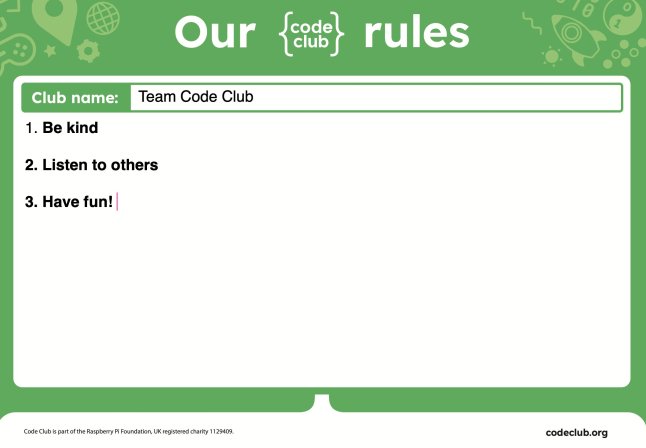
Setting up a positive and productive Code Club starts with involving your young creators in making the rules. This is a great icebreaker that gives them a sense of ownership. During this first session, spend about ten minutes asking the kids for their ideas on how the club should run. You can then use our “Club rules” template or let them get creative by drawing their own posters to display the rules. This helps create a fun, safe space where everyone can learn and thrive.

A poster displaying the rules of a Code Club session, highlighting kindness, listening to others, and having fun.

Discuss how to help each other

The best Code Clubs are built on a foundation of mutual support. At the start of a session, take a moment to set some ground rules on how to help each other. Talk about what to do when you get stuck. You can use the motto “Ask three, then me” to encourage young people to try to solve problems on their own before asking a mentor. Also, discuss how to give helpful feedback when testing each other’s projects. This creates a supportive and collaborative environment where everyone can do their best.

Activities for any session

These activities are great for kicking off any regular Code Club session, once you have your initial club rules and routine in place.

Use an icebreaker

An icebreaker is a quick, 15-minute activity. It’s a great way to start your Code Club session, helping everyone get to know each other and switch their focus from other activities. We suggest using an “unplugged” activity” — one that doesn’t require a computer — to help them transition.

A colorful infographic titled 'Introduce a teammate' for a Code Club icebreaker activity, outlining players, resources, and instructions for engaging participants.

Showcase a finished project

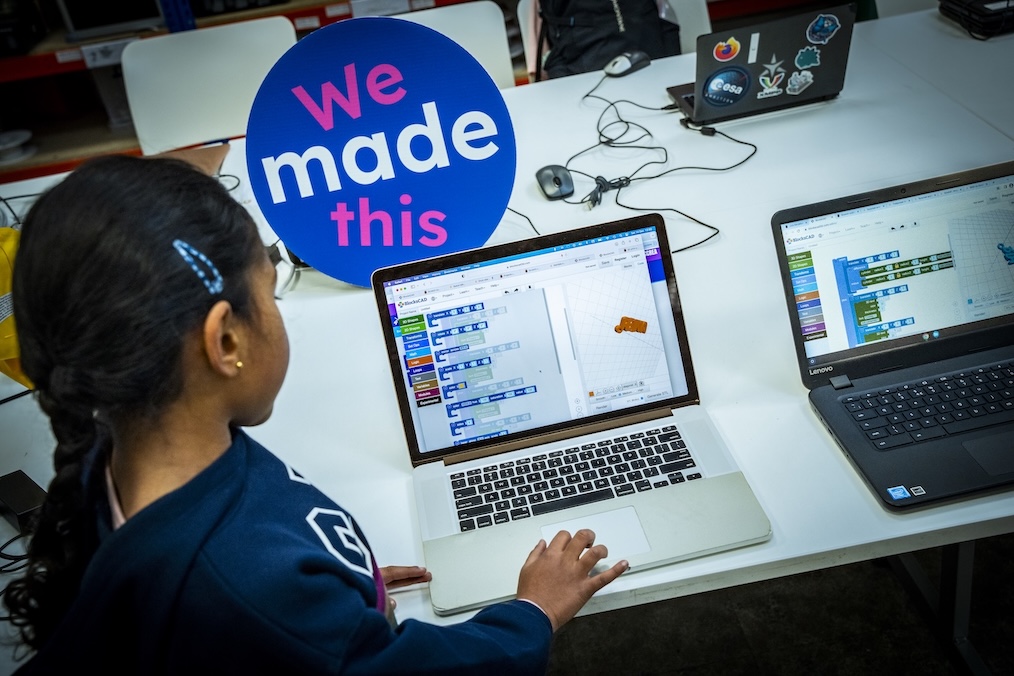
If your club is all working on the same project, a great way to start is by showing your creators the finished product they’ll be building. Our projects include a completed example just for this purpose, but you can also show one you made yourself. Seeing the final result gives creators a clear goal and can even spark ideas for how they can make the project their own.

A child engages with a laptop displaying a coding program, while a sign reading 'We made this' is prominently featured in the background.

Demonstrate a tricky section of code

Before the session, look for a part of the project that might be tricky for your creators. Taking a few minutes to show them a new idea — like how to layer code blocks or use a specific function — can be very helpful. This type of short demonstration gives creators the confidence to work more independently.

Explore projects together

Before a session, think about the projects your club will work on. The Code Club projects page has been updated with a fresh, new look and is filled with projects on a variety of topics, like space, art, and games. You can explore these together with your club to find the perfect projects for your group.

Explore the Code Club Leaders’ guide for more tips and information on getting your sessions up and running smoothly. 

What Dips Thompson, mentor of Cloudside Coders, learned during her first term at Code Club

Dips Thompson launched her Code Club, Cloudside Coders, at Cloudside Primary School in Nottingham, UK, in June 2025.

After completing her first term with creators aged between seven and eight, she’s sharing key lessons for new mentors.

A mentor points at a laptop screen displaying a Scratch programming interface while a young creator observes and engages during a Code Club session.

Kicking off club sessions

Our Code Club runs after school, and I’ve built a routine that helps everyone transition. Some of my amazing Code Club creators have jobs — they help get the iPads and login details ready and hand them out. It gives them a real sense of ownership over the club.

Once everyone’s settled, we spend a few minutes catching up, discussing their week and what they’re excited to create. I then introduce a collaborative project, showing the finished version before guiding them step-by-step. This often sparks their own ideas, encouraging variations later, which is a helpful approach for my young group.

Navigating logins

My biggest piece of advice for new Code Club mentors? Don’t get bogged down with logins, especially for younger creators. I learned this the hard way in my first session and saw creators struggle with keyboards and password complexities. 

We introduced Scratch logins in Week 3, and by Week 6, most creators could confidently remember their passwords. It was a game-changer!

Introducing Code Club projects

In our first session, I showed the Code Club project site, explaining the layout and how to use it. For my young creators, having two tabs open and following instructions independently felt a little overwhelming for them. We now follow the Scratch pathway together. I choose a project, and most creators follow my step-by-step guidance on their own devices. 

My goal is to gradually build their confidence and skills until they can tackle projects independently.

An informative webpage showcasing the Code Club, featuring sections on Scratch, Python, and Artificial Intelligence project paths. Each section includes a brief description of the coding project options available.

Adapting when things don’t go to plan 

Things rarely go exactly as planned in Code Club, and that’s totally normal. If I notice too many creators stuck on the same piece of code, struggling with logins, or if a lack of digital literacy skills is holding us back, I know it’s time to adapt.

I often split creators into groups to address common problems more efficiently. If a significant number of students can’t access a project due to digital literacy gaps, we’ll pause for a quick skills session, and maybe practice mouse control, typing, or navigation. I also encourage a “brain, book, buddy, boss” system. This empowers them to first think, check resources, ask a peer, and only then come to me. This approach builds their independence.

Giving creators ownership

To give creators more ownership, I encourage them to customise sprites and backgrounds. For our “Catch the Bus” project, for example, we kept the core code, but they were free to choose their own characters and settings. This led to awesome variations like “Catch the Hippo” or “Catch the Train,” which truly ignited their creativity. I’m hoping that as they get more confident, they’ll choose their own projects and pathways entirely. 

A playful cartoon cat running alongside a bright red double-decker bus on a sunny street, with green grass and clouds in the background.

Tips and resources that made running my Code Club easier

I’ve found a few key tips and resources helpful when launching my Code Club. 

Practical tips

  • Device checks: To ensure iPads are fully charged for Code Club sessions, we have a dedicated tech monitor who checks them on Code Club day. This has been super helpful.
  • Scratch Classroom: I use Scratch Classroom with anonymised accounts to easily generate usernames and passwords. This allows young people to log in quickly and save their work without frustration.
  • Peer support: I strategically group more confident programmers with less confident ones. This buddy system effectively handles many common questions.
  • Testing projects: Before I introduce any new project, I build it myself first. This helps me anticipate questions and spot any misconceptions creators might encounter.

Essential resources 

The Code Club website offers fantastic resources that were invaluable when I was starting out:

  • Code Club project site: A treasure trove of coding projects
  • Leader guide and session checklist: Essential for planning and running sessions
  • Code Club online course: Super useful for getting tips and ideas
  • Code Club Login letters/account permission: A lifesaver for getting parental consent
  • Progress Maps: A great way for creators to track the projects they’ve completed
Colorful introduction posters for different coding projects including Scratch, Python, micro:bit, and web development, displayed on a green background with playful icons.

Our Code Club is still in its early stages, but I have high hopes for it. I’m excited to dive back in come September and explore more Code Club resources, such as the one-page projects, and possibly even get creators involved in the Astro Pi Mission Zero and Coolest Projects.

Inspired by Cloudside Coders? Join the movement, and start a Code Club in your community!