Keeping young people safe: Top tips and useful resources

John McAtominey leads our work supporting Code Clubs in the UK, and is part of the safeguarding team at the Raspberry Pi Foundation. He also runs a Code Club in his local community, Selby CoderDojo. Here he shares his top tips and highlights some useful resources to help you keep your creators and mentors safe.

A group of children and mentors at a Code Club event, holding colorful signs that say 'Be Cool', 'Join the Club', 'We Made This', and '{code club}'. They are smiling and posing together in a classroom setting.

All Code Clubs running around the world in schools, libraries, and community spaces are unique. There is no one-size-fits-all approach to safety, but here are some key things to consider. It is important to think about other ways to make your club as safe as possible too!

Understanding and managing risks

Take a moment to think about any risks that might affect people in your club — and, most importantly, what you can do to reduce or remove these risks. Risks could include damaged electrical cables, or not having a way to block inappropriate content online. Create a risk assessment for your club — we have an example risk assessment you can use to help you get started. Work on your risk assessment as a group of mentors, review it regularly, and make sure it is always available. You can find out more about our health and safety guidelines here.

A template for a risk assessment form designed for Code Clubs, including sections for hazards, at-risk individuals, current measures, and actions to control risks.

Safeguarding sponsors

Depending on where your club meets, you might have been asked to nominate a safeguarding sponsor. A safeguarding sponsor is someone with experience of safeguarding outside of the club and who has undertaken safeguarding training recently. Safeguarding sponsors should visit the club regularly, giving you support and advice on how to keep everyone safe. If it has been a while since their last visit, invite them to your next session and discuss what is going well and what might need improving. You can find out more about safeguarding sponsors here.

Background checks

A background check is an important way to check that someone is suitable to work with young people. All Code Club leaders and mentors should have an up-to-date background check specific to their region or country. If any club leaders or mentors involved in your club do not have a background check, it is important you act now to get them in place. You can find out more about background checks here, including specific guidance for club leaders and mentors in the UK and Republic of Ireland. If you are not sure about background checks in your country, please contact us and we will be happy to help.

As a club leader, you can also ask a new mentor to provide you with two references. A referee should be someone who is not related to the mentor and has known them for a reasonably long time. Work colleagues, line managers, and other people they have volunteered with are great choices. You should contact the referees to check they believe the mentor is honest, reliable, responsible, and suitable to work with young people.

Training

Having well-trained mentors who know how to support young people, how to spot signs a young person might be at risk, and what to do if they have a concern is critically important! At Code Club, we have a great safeguarding e-learning module that covers the key things you need to know. We also have a helpful mentoring e-learning module where you can learn more about different club activities, mentoring styles, the support and resources we have available, and more. These free e-learning modules are brilliant for all mentors involved in Code Clubs!

A digital interface of a safeguarding module from Code Club showcasing various topics related to child safeguarding, including a navigation menu on the left and colorful illustrations of three diverse characters on the right.

Code of behaviour

It is important that mentors know how they are expected to behave at Code Club — and it is helpful to talk about both the behaviours that will help make sure your Code Club is a safe, positive space, and the behaviours to avoid! Check out our handy mentor code of behaviour and share it with your team so everyone knows what is expected.

Registration forms

Having a registration form for your Code Club sessions makes it easier to manage numbers of creators and find out if creators require any support to access the sessions. It is also a good way to collect extra details like food allergies if your club activities will involve food, and to safely check people in and out of each session.

Sometimes things don’t go as planned and you may need to contact a parent or carer quickly. That’s why it is important to also collect emergency contact information in your registration form, even if a parent or carer stays for the session.

The Code Club platform allows you to create events that participants can register to attend. You can capture important information about participants, check participants in and out of sessions, and more, and it is completely free to use!. Log in to your dashboard to set up your next event.

Screenshot of the Code Club dashboard showing options to manage clubs, training, and support resources.

Posters

If a creator does not feel safe or happy, or they are worried about someone else, they might not know who to talk to. You can help by displaying our ‘Safe and happy’ posters, which you can customise for your club. You can download a PDF, edit a copy in Google Slides, or use the Canva template to make your own, then print and display them in your club venue.
If your Code Club is in the Republic of Ireland, you will need to display a child safeguarding statement that includes a risk assessment and key contact details. We have created a template guide (available as a Microsoft Word file (.docx) or a PDF) that you can download, which also includes links to additional guidance from Tusla.

What is in creators’ projects?

If something is not right in a creator’s life, they might not tell you, but you might see something in their projects that concerns you. They might express how they feel, or replicate behaviours they have seen at home, through their projects. As great mentors, you will already be talking to them about what they are working on, but if you see something that doesn’t look right, it is important to know what to do.

Creators use lots of platforms to build their projects. Some let them share projects so others can build on their work or add comments. This can be really positive, but there’s a risk someone could add inappropriate content to their project. The NSPCC have great resources you can use to help creators stay safe online, but you could consider switching off social features or using teacher or educator accounts where available

Knowing how to deal with a concern

If you have seen or heard something that doesn’t look right, it is important not to panic. The team at the Raspberry Pi Foundation is here to support you. We have created a guide on how to deal with safeguarding concerns — read it, share it with your mentors, and keep a copy at your Code Club.

For more resources to help make sure your Code Club offers a safe, positive environment for young people, take a look at our ‘Keeping everyone safe’ page and our safeguarding policy. If you have other ideas on how we can help keep young people safe, please contact us!

How to begin your Code Club session

Welcome to your Code Club session! The first few minutes of any session are a perfect chance to get everyone settled and ready for some fun. By using a few simple activities, you can create a great atmosphere where every club member feels comfortable and excited to start coding.

To ensure everything runs smoothly and safely, be sure to use a “session checklist” to plan what you need to do before, during, and after each session.

A graphic featuring the 'Code Club' logo and a layout of a leader guide, including sections on accessibility, contents, and a session checklist.

Activities for your first session

Some activities are best for your very first session. These are about setting up a great environment for the rest of your Code Club’s journey.

Work together to create a session routine

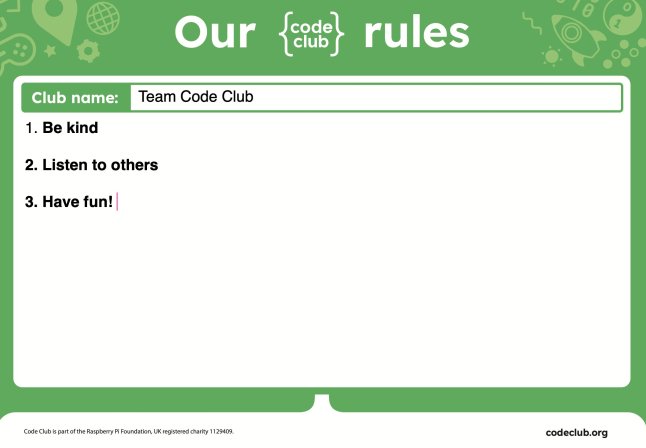
Setting up a positive and productive Code Club starts with involving your young creators in making the rules. This is a great icebreaker that gives them a sense of ownership. During this first session, spend about ten minutes asking the kids for their ideas on how the club should run. You can then use our “Club rules” template or let them get creative by drawing their own posters to display the rules. This helps create a fun, safe space where everyone can learn and thrive.

A poster displaying the rules of a Code Club session, highlighting kindness, listening to others, and having fun.

Discuss how to help each other

The best Code Clubs are built on a foundation of mutual support. At the start of a session, take a moment to set some ground rules on how to help each other. Talk about what to do when you get stuck. You can use the motto “Ask three, then me” to encourage young people to try to solve problems on their own before asking a mentor. Also, discuss how to give helpful feedback when testing each other’s projects. This creates a supportive and collaborative environment where everyone can do their best.

Activities for any session

These activities are great for kicking off any regular Code Club session, once you have your initial club rules and routine in place.

Use an icebreaker

An icebreaker is a quick, 15-minute activity. It’s a great way to start your Code Club session, helping everyone get to know each other and switch their focus from other activities. We suggest using an “unplugged” activity” — one that doesn’t require a computer — to help them transition.

A colorful infographic titled 'Introduce a teammate' for a Code Club icebreaker activity, outlining players, resources, and instructions for engaging participants.

Showcase a finished project

If your club is all working on the same project, a great way to start is by showing your creators the finished product they’ll be building. Our projects include a completed example just for this purpose, but you can also show one you made yourself. Seeing the final result gives creators a clear goal and can even spark ideas for how they can make the project their own.

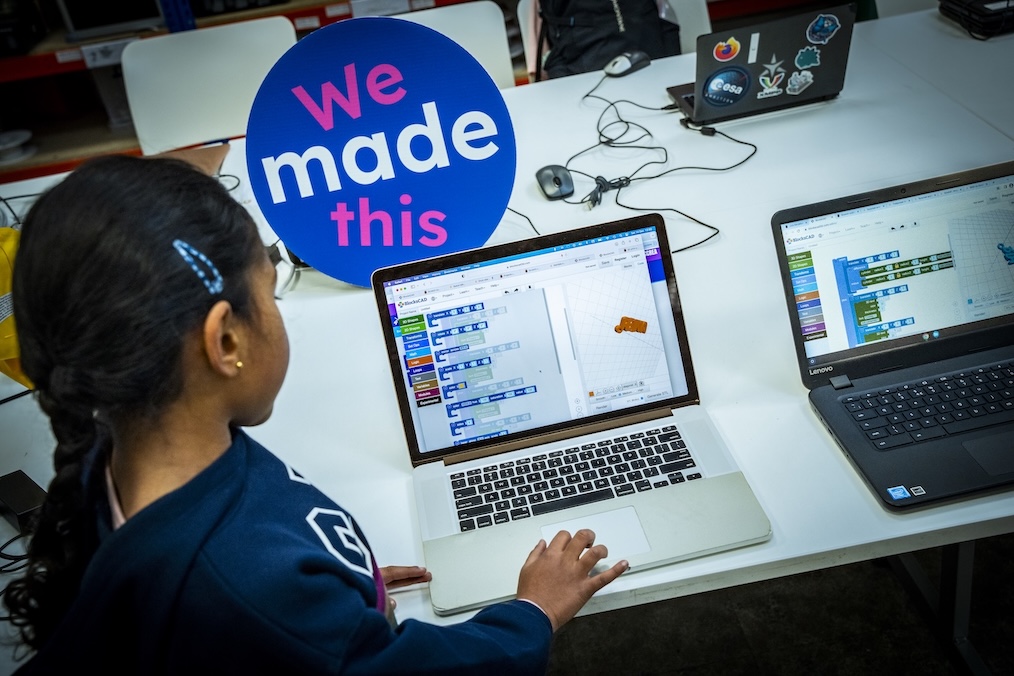
A child engages with a laptop displaying a coding program, while a sign reading 'We made this' is prominently featured in the background.

Demonstrate a tricky section of code

Before the session, look for a part of the project that might be tricky for your creators. Taking a few minutes to show them a new idea — like how to layer code blocks or use a specific function — can be very helpful. This type of short demonstration gives creators the confidence to work more independently.

Explore projects together

Before a session, think about the projects your club will work on. The Code Club projects page has been updated with a fresh, new look and is filled with projects on a variety of topics, like space, art, and games. You can explore these together with your club to find the perfect projects for your group.

Explore the Code Club Leaders’ guide for more tips and information on getting your sessions up and running smoothly. 

Mvelo Hive Trust: Building confidence in young coders through Code Club

Mvelo Hive Trust, a global Code Club Partner, is a non-profit organisation whose mission is to enable marginalised groups and communities in Zimbabwe to gain access to education, technology, and skills through activities like Code Club.

Three young girls engaged in a coding activity, focused on a laptop with Code Club stickers, in a classroom setting.

Ruhee Shah, Global Partnerships Coordinator at the Raspberry Pi Foundation spoke to Blessed Moyo, Co-founder and CEO of Mvelo Hive Trust about their work and how Code Club inspires confidence in young creators.

From inspiration to a network of Code Clubs

Inspired by Africa Code Week, a digital literacy programme set up in 2015 to empower young people across the continent with essential coding and digital skills, Mvelo Hive Trust wanted to provide regular digital skills training, by offering consistent sessions through a network of Code Clubs. Their experience at Africa Code Week highlighted a significant gap: students in low-income communities lacked consistent, hands-on exposure to programming and collaborative problem-solving. There was no local space for them to regularly explore coding, troubleshoot, and develop projects. They noticed that many young students, despite their enthusiasm for creating games with Scratch, had little access to even basic coding tutorials.

“We wanted to equip learners with resources and digital skills that went beyond just learning how to code using Scratch, we wanted to provide lifelong learning in STEM and inspire the next generation to take up skills in coding.”
– Blessed Moyo, Co-founder and CEO at Mvelo Hive Trust

An insight into Code Club sessions

Since setting up their first Code Club only a year ago, Mvelo Hive Trust now reaches an incredible 350 learners each week in 8 different schools. Each session hosts young people aged 9 to 12 and is usually attended by educators who teach computing and digital learning. Blessed says the atmosphere is always energetic and supportive, as they focus on peer mentoring. They typically draw on resources from the Raspberry Pi Foundation and Code Club projects websites. The projects they use vary, including the introduction to Scratch projects ‘Space talk’ and ‘I made you a book’. Some clubs have begun to use more advanced Scratch projects like ‘Broadcasting spells’ and ‘Don’t fall in’.

A group of young learners holding up Scratch coding certificates outdoors, smiling and celebrating their achievements.

Building confidence in young coders

Blessed believes creating a supportive environment helps young creators grow the confidence to continue building and experimenting. In their first session, creators begin with a simple, guided project like ‘Space talk’, which allows them to see their ideas come to life. By dragging their first blocks and creating a basic animation, students gain an immediate sense of accomplishment and self-belief.

“A student, Sthandekile Ncube from Baines Jr Code Club, arrived [to her first code club session] shy and hesitant. By the end of that hour, she’d animated a bouncing ball and helped a classmate debug their code. Weeks later, she volunteered to demonstrate her project to the entire club.”

Regular celebrations are also incredibly important in making sure young coders build their confidence. By giving out monthly certificates to recognise milestones, or ‘high-five’ walls to encourage peer-to-peer praise, the focus shifts from perfection to progress.

“At one celebration, Joelle Steblecki from Moray Code Club, received applause for her problem-solving champion certificate. Her beaming smile was contagious — she told us she finally felt ‘like I belong in tech’.”
– Blessed Moyo, Co-founder and CEO at Mvelo Hive Trust

A classroom setting with young students sitting in front of computers, engaged in coding activities using Scratch.

Beyond Code Club

For the young people leaving Code Clubs, Blessed hopes that they carry with them a curiosity for lifelong learning, a capacity for creative problem-solving, and the confidence to experiment and “fail forward”.
Joelle Steblecki and Elton Muyambo, both from the Moray Code Club in Bulawayo, have already shown this. They represented their school at a tech competition with over 10 primary schools in Bulawayo, where their AI project earned them fourth place. Their success, and that of other young creators, shows that Code Club is a great foundation for future innovators, helping them explore potential careers in STEM.

What’s next for Mvelo Hive Trust?

With support from the city’s Mayor, Mvelo Hive Trust is actively working to expand its reach by establishing Code Clubs in the 29 schools managed by the Bulawayo City Council. They are also approaching local telecommunications companies to secure corporate partnerships and local funding, aiming to implement the Code Club programme across more schools.

Want to run your own Code Club? Find out more on how to get started.