Micro-interview with the new US Club Program Coordinator Amanda

So far in our micro-interview series, we’ve chatted to educators and young coding enthusiasts and heard about their Code Club experiences. For this interview, we’re doing something a little bit different. We’re featuring one of our very own Code Club team members!

Meet Amanda, our new Club Program Coordinator in the US! Based in Atlanta, Georgia, Amanda joined our team last month and has already blown us away with her brilliant ideas and her sparkling personality. 

Join us as we get to know Amanda!

Photo Credit: Daniella Almona

What Code Club projects do you enjoy?  

At the Minnesota State Science and Engineering Fair, I worked on the ‘Random sparkles’ project with the students who came up to our table. It was my first time doing this project but WOW did those kids teach me a lot. 

Instead of making random sparkles appear, I saw one student intentionally create a smiley face, which inspired me to create and teach others to make any shape they like. 

I’m also excited to try the ‘Dodgeball’ project in Module 2 of Scratch. Dodgeball was one of my favourite games in primary school, it never gets old!

Which communities in the USA will you be supporting? Can you explain how you plan to engage with these communities?

I live in Georgia and am very excited to start growing and supporting the Code Club community here. I’m eager to visit organisations that are already established in the education sector and see how the Raspberry Pi Foundation can amplify their mission.

My role isn’t exclusively working with adults to set clubs up, I also want to listen to the young people who attend our Code Clubs — they always remind me of the reason why we do what we do!

Additionally, I am beyond excited to begin our webinar series with Kevin. We’re all in this together, so as much as we want to get to know our clubs, they should also get a chance to get to know us too.

Can you share a surprising skill or hidden talent you have?

I can skateboard.

If you could have a superpower to support the USA Code Club community, what would it be and why?

I’d love to be able to sense who wants to start or be part of a Code Club anywhere in the US, so I could equip them with the resources they need to fulfil their coding goals and dreams!

If you could say one thing to all the Code Club volunteers and educators in the USA, what would it be?

Through your hands-on work in equipping our nation’s young people with the skills, knowledge, and confidence in digital making, you’re helping them build a brighter future.

Your drive to educate young people in coding inspires me to work hard for you in return.

Thank you so much, Amanda. And welcome to the team! 

If you’d like to get to know more about Amanda and the other half of our US clubs team, Kevin, join their monthly webinars every third Thursday at 12pm PT/2pm CT/3pm CT. 

Express yourself: Make a mood board webpage in your Code Club

Our ‘Mood board’ project, from the Introduction to web design path, helps young people turn their inspiration into a mood board webpage, filled with colours, images, and fonts they’ve carefully selected.

Kevin, Club Programs Manager, USA, explains why ‘Mood board’ is a great creative outlet for your club members and why a mood board webpage is a fun way for young people to share their interests and creativity with the world in the 2024 Coolest Projects online showcase.

Kevin standing on a cliffs edge, with a mountain behind him and the sea in the background.
Kevin, Clubs Programs Manager, USA

Hi Kevin! Can you share one of your favourite Code Club projects with us?

Oh yes! I’ve had so much fun coding through our ‘Mood board’ project, a design project in our ‘Introduction to web: HTML, CSS, and animations’ project path. 

If you’re not sure what a mood board is, think of it as a visual noticeboard, where you can gather images, colours, ideas — anything that sparks inspiration! 

I chose this project because creating a physical mood board can be overwhelming with the different materials they require. But this project centralises all the materials into one place, so I have unlimited options for what I can create! 

Alongside the creative elements of this project, it’s a great introduction for coders to learn how to structure and style webpages. As HTML and CSS are relatively easy to pick up, it gives young people quick successes to celebrate! 

‘Mood board’ project

 Who do you think this project is suitable for?

HTML and CSS are fantastic ways to introduce young coders to web development. This project provides immediate visual feedback as coders can change colours, add images, and play with fonts. 

If you have coders who love to map out their steps to success before getting started, ‘Mood board’ is the perfect project for them! Sometimes you have to visualise your goals before you can see the steps to take to achieve them, and this project will teach them how to do just that! 

What skills will young people learn from completing ‘Mood board’?  

This project encourages young people to explore creative self-expression. I found it helped me gain a clearer picture of how I like to share my creativity with others.

Not only did it help me feel more comfortable making design choices, but also helped me to organise my thoughts so that I could truly see how I might go about completing a goal or sharing a topic that matters to me. 

What are the development/remix opportunities?  

I love expressing myself with unique fonts and colours! I’d encourage coders to create their own custom fonts and colours for a truly one-of-a-kind mood board webpage. 

Once they have completed their mood board, I’d support young coders to present their mood board to their peers and ask for feedback. They could also set their peers a challenge to create their own! 

How can young people use the ‘Mood board’ project to enter Coolest Projects? 

If a young coder has an idea for solving a problem in their community or a passion they want to share with the world, they can enter their mood board into Coolest Projects

Kevin and Zoe in a busy room talking to a young person.
Kevin at Coolest Projects Ireland 2024

Thank you, Kevin! 

Encourage your club members to develop their skills with ‘Mood board’! They can show off their work by submitting it to the Coolest Projects showcase and celebrate their achievements with young coders around the world!

Young people have until 22 May to submit their creations to Coolest Projects. If you need further support, check out the resources for mentors webpage. Make sure you share your progress on X using the hashtag #CoolestProjects.

‘Hello World’: The perfect Python project for your Code Club

Are you ready to introduce your Code Club members to the exciting world of text-based coding? Vasu, our Programme Manager in India, shares her enthusiasm for our ‘Hello World’ Python project. Discover why it’s the perfect starting point for anyone wanting to learn Python and how your young coders can showcase their creations in the 2024 Coolest Projects online showcase.

Vasu waving
Meet Vasu

Hi Vasu! You’ve introduced a lot of young people in India to our projects. Can you share your favourite with us? 

Great question! As someone with no formal coding background, diving into Scratch and Python has been quite a journey. A standout for me is the Python ‘Hello World‘ project. It’s a fantastic starter for anyone — after all, who doesn’t love emojis? 😄

This project is in our Introduction to Python: Variables, functions, and loops path and it serves as an excellent introduction to the Explore projects of 3…2…1…Make! 

‘Hello World’

Who do you think this project is suitable for? 

It’s a great project for all ages! It’s the perfect way to show beginners how approachable Python can be, especially for those nervous about moving on from block-based programming languages, like Scratch. They’ll quickly see it’s not as intimidating as it seems! Go on, give it a go! 

What skills will young people learn from completing ‘Hello World’?  

As Code Club members work through this path, they create an interactive project that uses emojis, they’ll learn how to store text and numbers in variables, and use functions to organise their code. 

What struck me wasn’t just the technical skills gained from working through the project, but the shift in mindset it brought. It’s a confidence booster for beginners, easing anxiety and building the skills to progress on to the other projects in the ‘Introduction to Python’ path. 

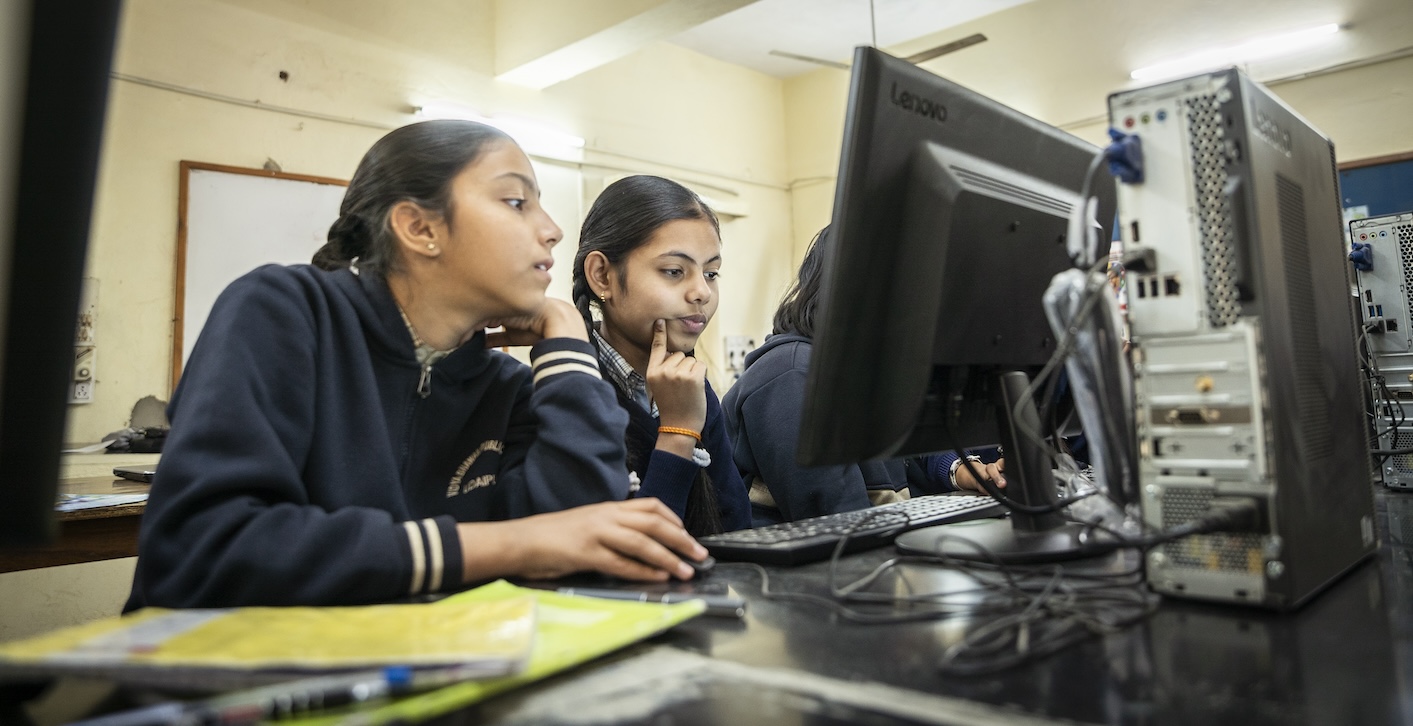
A row of young people looking at computer screens in a classroom.
Young coders from Udaipur, India

Do you have any tips for introducing this project into a Code Club session?  

The key tip is ensuring kids have a solid foundation in block-based coding skills before transitioning to text-based programming. Once they’re comfortable with programming basics, help them transition into Python. 

Our ‘Hello World’ project is also one of the projects where we’re trialling the full integration of our new Code Editor! Within the code editor, young people can have the project guide and code in the same window. As we’ve removed the need to switch tabs, learners can focus on coding and having fun! 

How can young people use the ‘Hello World’ project to enter Coolest Projects? 

It is an easy project to start with. Young people can use the skills learnt in this project and upgrade their project with different texts and emojis, or add comments to their code. At the end of the project, young people get some great ideas for upgrading their work. I encourage them to explore these examples and see how they can take their projects further.

Once they’re happy with their project, they can then record a video of their creation and enter Coolest Projects!

Two girls look at a computer screen.
A Code Club in Udaipur

Thanks, Vasu! 

‘Hello World!’ encourages your club members to build their Python programming skills. Why not showcase this achievement and celebrate their work by submitting it to the Coolest Projects showcase?

Young people have until 22 May to submit their creations. If you need further support, check out the resources for mentors webpage. Make sure you share your progress on X using the hashtag #CoolestProjects.